
How to view usage and billing
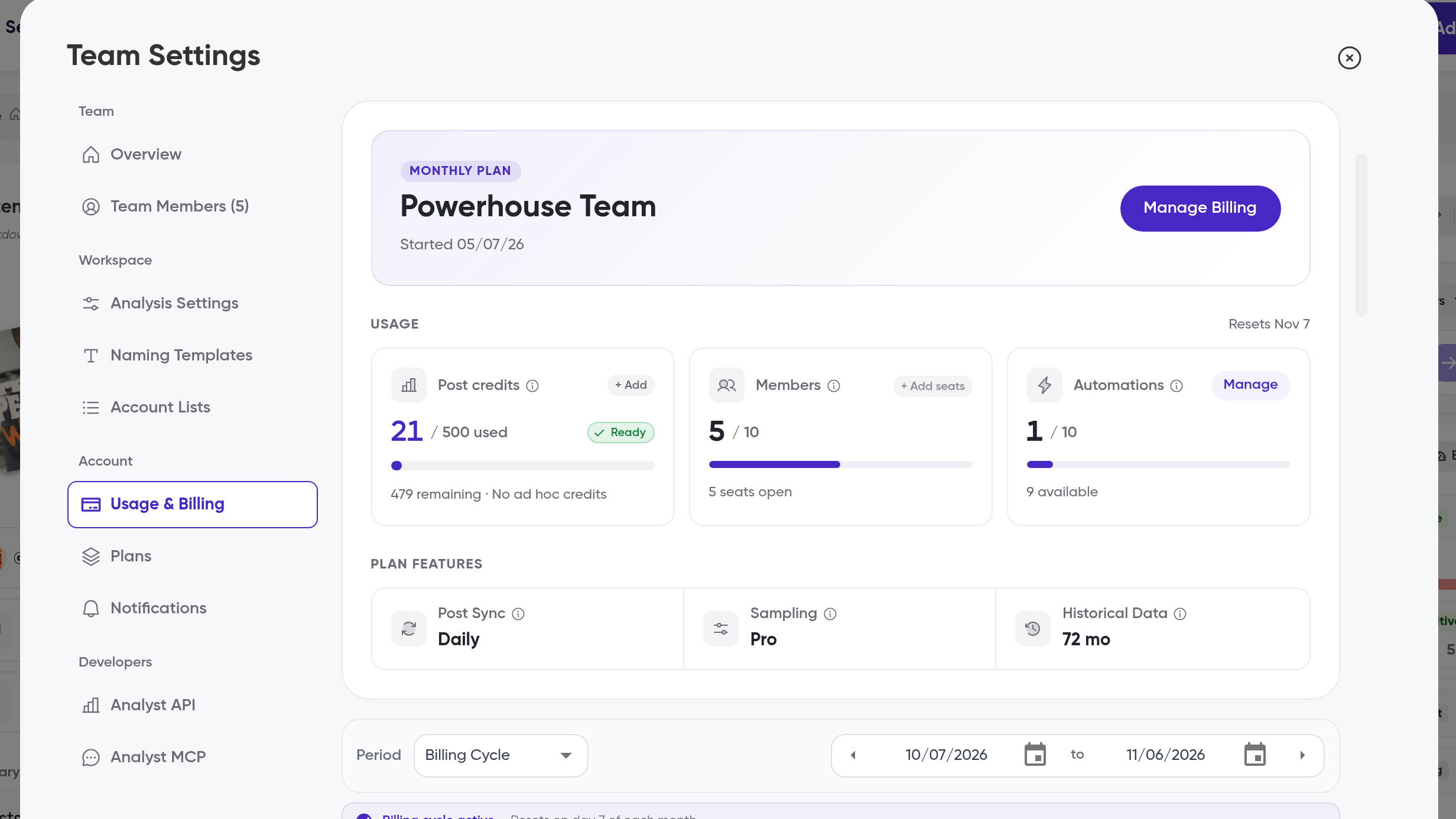
Use the Usage & Billing page in Team Settings to see how much of your plan's credits your team has used this cycle, and to export a usage report for finance or stakeholders.
Open the Usage & Billing page
Open Team Settings
Go to Usage & Billing
Review your usage counts for the current cycle
What the page shows
The page breaks down every credit type on your team:
Post credits — posts you have analyzed this cycle
MAPs — Monthly Analyzed Posts, the posts counted against your monthly analysis allowance
Ad hoc credits — additional post credits, separate from your plan's monthly allowance
Automations — how many automations are active, for example 1 of 10
For a quick check without leaving your workflow, the Add Content button shows how many post credits you have used and have left this month, along with your status and reset date. See How to track MAPs usage.
Export your usage data
On the Usage & Billing page, find the Usage Analytics section
Use Copy Data to copy a usage snapshot to your clipboard, or Export PDF to download it as a PDF
Use the Detailed Usage export to download your full usage as a CSV or PDF
What's next
See How to track MAPs usage for what counts toward your Monthly Analyzed Posts, or How to purchase a plan to change your plan or buy additional credits.